Supports headless Mac instances

Deploy a headless Mac mini or Mac Studio instance as a dedicated local inference host with lmm-host, then monitor unified memory, inspect active context sizes, and see loaded models over mutual TLS (mTLS) from your primary Mac.

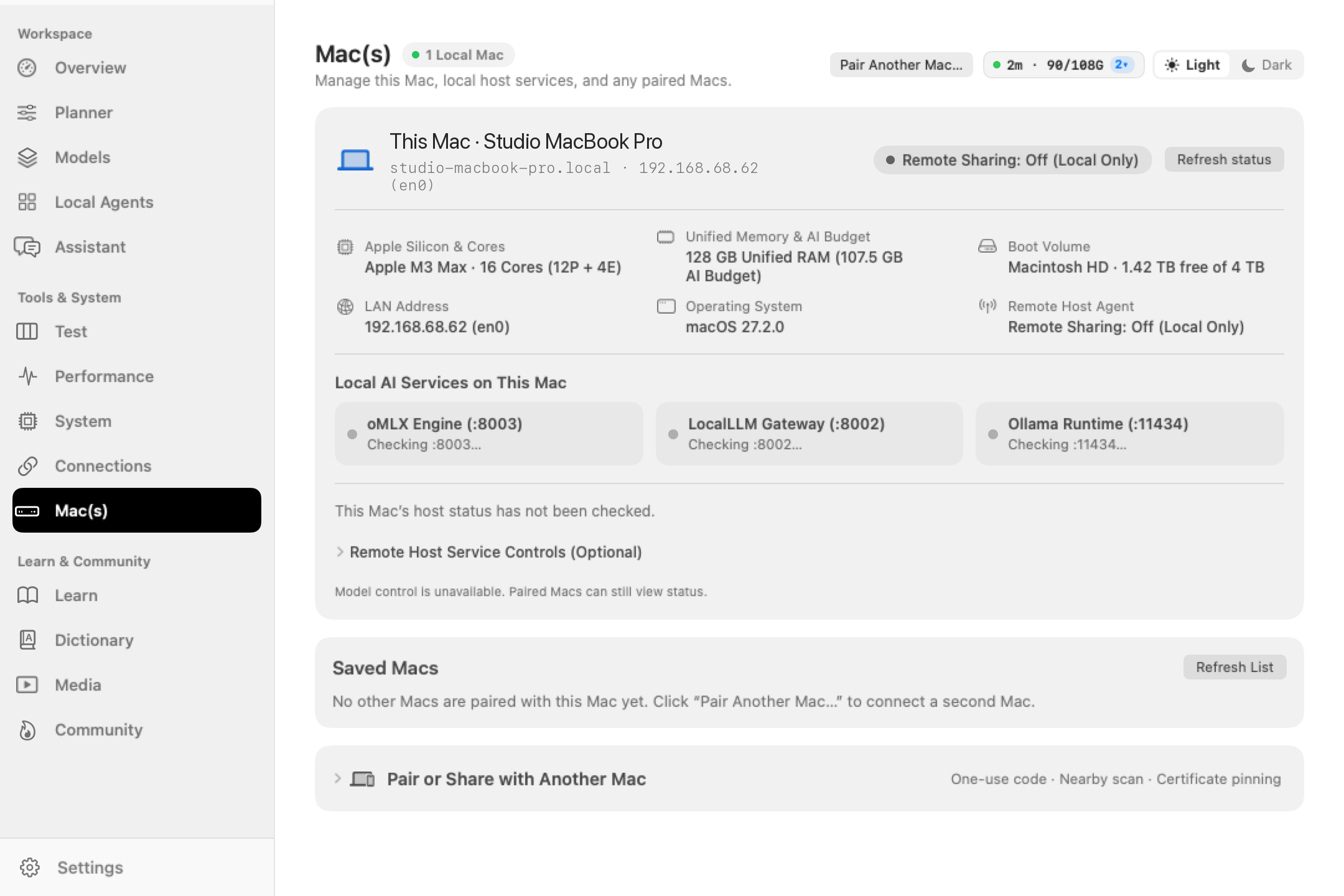
LMM Mac(s) window showing headless instance pairing, hardware telemetry, and mutual TLS host controls
Mac(s) · Headless Host Daemon (`lmm-host`) Mutual TLS (mTLS) · 6-digit pairing · launchd background service

Step 1

One-line installer or manual `lmm-host` setup

On the headless Mac, run the installer over SSH or Terminal. It downloads the current LMM release, checks its SHA-256 against the published checksum, confirms it is notarized by Apple and signed by our Developer ID (Team DYCHW4WLUZ), installs LMM.app, links lmm-host into your PATH and registers the per-user LaunchAgent:

curl -fsSL https://localmodelmanager.com/install-host.sh | bash

To update, run the same command again. To remove it: curl -fsSL https://localmodelmanager.com/install-host.sh | bash -s -- --uninstall

Prefer manual setup? Install LMM.app from the disk image, then run /Applications/LMM.app/Contents/MacOS/lmm-host install. Run lmm-host from inside the app; copied-out binaries cannot find their resources.

To check a download yourself: shasum -a 256 LMM-<version>.dmg and compare it with https://download.localmodelmanager.com/LMM-<version>.dmg.sha256.

Automatic login requirement: Because lmm-host runs as a per-user LaunchAgent with access to your user session and Metal GPU context, turn on automatic login in macOS System Settings > Users & Groups on the headless Mac until system-wide LaunchDaemon support ships.

After LMM's move to Developer ID signing, hosts installed with an earlier installer must re-run the installer and pair again.

Step 2

6-digit pairing code and mutual TLS

Start pairing on the headless host to open a 10-minute pairing window and generate a short-lived 6-digit pairing code:

lmm-host pair-window
  • Local network (Bonjour)On the same LAN, open LMM on your desk Mac, choose Hosts > Add Host, select the discovered Mac, and enter the 6-digit code.
  • Tailscale or custom hostnameAcross subnets, enter the host’s IP address, local hostname, or Tailscale hostname directly. Both Macs exchange client and server certificates and communicate over mutual TLS (mTLS).

Step 3

Read-only monitoring

Pairing grants read-only monitoring: your desk Mac can see the host's unified memory headroom, loaded models and server health. Loading or unloading models from a paired Mac is not available in this version.

Unpair a device at any time with lmm-host revoke <client-id> or from the LMM Hosts view.

Step 4

Seat counting and direct local connections

  • Counts as one MacA headless Mac mini or Mac Studio running LMM or lmm-host counts as one Mac in your license plan, the same as a laptop or desktop. Activate it on the host with lmm-host license activate ~/Downloads/LMM.lmmlicense, or turn on Host mode from a licensed LMM on that Mac. Choose a 2-Mac or 5-Mac plan to cover both your desk Mac and your headless server.
  • Direct Mac-to-Mac trafficStatus requests travel directly between your paired Macs over mTLS. LMM never relays your prompts, files, or host status through our servers.

Cover your primary Mac and your headless instances

Choose a 2-Mac or 5-Mac license plan, or contact support if you have questions about your multi-Mac headless setup.